

An open source integration manager for matrix clients, like Element. For help and support, please visit us in #dimension:t2bot.io on Matrix.
See docs/installing.md for more information on running Dimension.
- Check that federation is enabled and working on your homeserver. If you're not intentionally running Dimension in a non-federated environment, make sure that your homeserver is configured correctly. If you are running in a non-federated environment, consult docs/unfederated.md.
- Check your SRV records and .well-known delegation. If you are using SRV records to point to your federation port, make sure that the hostname and port are correct, and that HTTPS is listening on that port. Dimension will use the first record it sees and will only communicate over HTTPS. If you're using .well-known delegation for federation, double check that is set up correctly.
- Verify the homeserver information in your configuration. The name, access token, and client/ server API URL all need to be set to point towards your homeserver. It may also be necessary to set the federation URL if you're running a private server.
- Run the troubleshooter. If you're on Element, type
/addwidget https://dimension.t2bot.io/widgets/manager-testin a private room then click the button.
Integration managers aim to ease a user's interaction with the various services a homeserver may provide. Often times the integrations manager provided by Element, is more than suitable. However, there are a few cases where running your own makes more sense:
- Wanting to self-host all aspects of your services (client, homeserver, and integrations)
- Wanting to advertise custom bots specific to your homeserver
- Corporate or closed environments where the default integration manager won't work
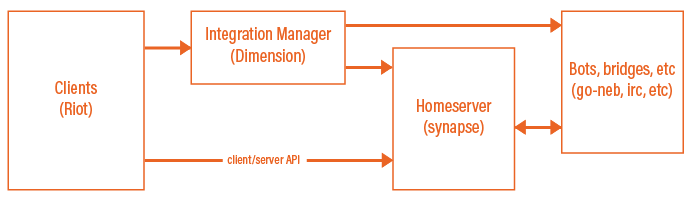
Integration managers sit between your users and your integrations (bots, bridges, etc). It helps guide users through the configuration of your integrations for their rooms. The integrations manager can only manage integrations it is configured for. For example, Modular can only provide configuration for the bridges and bots running on matrix.org, while Dimension can provide configuration for your own bots and bridges.
The infrastructure diagram looks something like this:
For more information about working on Dimension, see DEVELOPMENT.md.
For information about Dimension's license, please see the LICENSE file included in this repository.