You signed in with another tab or window. Reload to refresh your session.You signed out in another tab or window. Reload to refresh your session.You switched accounts on another tab or window. Reload to refresh your session.Dismiss alert
Copy file name to clipboardExpand all lines: README.md
+66-22Lines changed: 66 additions & 22 deletions
Display the source diff
Display the rich diff
Original file line number
Diff line number
Diff line change
@@ -66,7 +66,7 @@ All the parameters and functions passed to the GA class constructor are used as
66
66
-`mutation`: Refers to the method that applies the mutation operator based on the selected type of mutation in the `mutation_type` property.
67
67
-`select_parents`: Refers to a method that selects the parents based on the parent selection type specified in the `parent_selection_type` attribute.
68
68
-`best_solutions_fitness`: A list holding the fitness values of the best solutions for all generation.
69
-
-`best_solution_generation`: The generation number at which the best solution is reached. It is only assigned the generation number after the `run()` method completes. Otherwise, its value is -1.
69
+
-`best_solution_generation`: The generation number at which the best fitness value is reached. It is only assigned the generation number after the `run()` method completes. Otherwise, its value is -1.
70
70
-`cal_pop_fitness`: A method that calculates the fitness values for all solutions within the population by calling the function passed to the `fitness_func` parameter for each solution.
71
71
72
72
Next, the steps of using the PyGAD library are discussed.
@@ -76,12 +76,12 @@ Next, the steps of using the PyGAD library are discussed.
76
76
To use PyGAD, here is a summary of the required steps:
77
77
78
78
1. Preparing the `fitness_func` parameter.
79
-
2. Preparing other parameters.
80
-
3.Example of preparing the parameters.
81
-
4.Import the `pygad.py` module.
82
-
5.Create an instance of the `GA` class.
83
-
6.Run the genetic algorithm.
84
-
7.Plotting Results.
79
+
2. Preparing Other Parameters.
80
+
3.Import `pygad`.
81
+
4.Create an Instance of the `pygad.GA` Class.
82
+
5.Run the Genetic Algorithm.
83
+
6.Plotting Results.
84
+
7.Information about the Best Solution.
85
85
8. Saving & Loading the Results.
86
86
87
87
Let's discuss how to do each of these steps.
@@ -118,9 +118,9 @@ The function must accept 2 parameters:
118
118
119
119
By creating this function, you are ready to use the library.
120
120
121
-
### Example of Preparing the Parameters
121
+
### Preparing Other Parameters
122
122
123
-
Here is an example for preparing the parameters:
123
+
Here is an example for preparing the other parameters:
124
124
125
125
```python
126
126
num_generations =50
@@ -143,7 +143,7 @@ mutation_type = "random"
143
143
mutation_percent_genes =10
144
144
```
145
145
146
-
#### Optional`callback_generation` Parameter
146
+
#### The`callback_generation` Parameter
147
147
148
148
In PyGAD 2.0.0 and higher, an optional parameter named `callback_generation` is supported which allow the user to call a function (with a single parameter) after each generation. Here is a simple function that just prints the current generation number and the fitness value of the best solution in the current generation. The `generations_completed` attribute of the GA class returns the number of the last completed generation.
149
149
@@ -161,21 +161,21 @@ ga_instance = pygad.GA(...,
161
161
...)
162
162
```
163
163
164
-
After the parameters are prepared, we can import the `pygad`module and build an instance of the GA class.
164
+
After the parameters are prepared, we can import the `pygad` and build an instance of the GA class.
165
165
166
-
### Import the `pygad.py` Module
166
+
### Import the `pygad`
167
167
168
-
The next step is to import the `pygad` module as follows:
168
+
The next step is to import `pygad` as follows:
169
169
170
170
```python
171
171
import pygad
172
172
```
173
173
174
-
This module has a class named `GA` which holds the implementation of all methods for running the genetic algorithm.
174
+
PyGAD has a class named `GA` which holds the implementation of all methods for running the genetic algorithm.
175
175
176
-
### Create an Instance of the `GA` Class.
176
+
### Create an Instance of the `pygad.GA` Class.
177
177
178
-
The `GA` class is instantiated where the previously prepared parameters are fed to its constructor. The constructor is responsible for creating the initial population.
178
+
The `pygad.GA` class is instantiated where the previously prepared parameters are fed to its constructor. The constructor is responsible for creating the initial population.
print("Parameters of the best solution : {solution}".format(solution=solution))
231
+
print("Fitness value of the best solution = {solution_fitness}".format(solution_fitness=solution_fitness))
232
+
print("Index of the best solution : {solution_idx}".format(solution_idx=solution_idx))
233
+
```
234
+
235
+
Using the `best_solution_generation` attribute of the instance from the `pygad.GA` class, the generation number at which the **best fitness** is reached could be fetched.
236
+
237
+
```python
238
+
if ga_instance.best_solution_generation !=-1:
239
+
print("Best fitness value reached after {best_solution_generation} generations.".format(best_solution_generation=ga_instance.best_solution_generation))
240
+
```
241
+
220
242
### Saving & Loading the Results
221
243
222
-
After the `run()` method completes, it is possible to save the current instance of the genetic algorithm to avoid losing the progress made. The `save()` method is available for that purpose. According to the next code, a file named `genetic.pkl` will be created and saved in the current directory.
244
+
After the `run()` method completes, it is possible to save the current instance of the genetic algorithm to avoid losing the progress made. The `save()` method is available for that purpose. Just pass the file name to it without an extension. According to the next code, a file named `genetic.pkl` will be created and saved in the current directory.
223
245
224
246
```python
225
-
# Saving the GA instance.
226
-
filename ='genetic'# The filename to which the instance is saved. The name is without extension.
247
+
filename ='genetic'
227
248
ga_instance.save(filename=filename)
228
249
```
229
250
230
251
You can also load the saved model using the `load()` function and continue using it. For example, you might run the genetic algorithm for a number of generations, save its current state using the `save()` method, load the model using the `load()` function, and then call the `run()` method again.
@@ -313,14 +333,38 @@ print("Best solution reached after {best_solution_generation} generations.".form
313
333
To start with coding the genetic algorithm, you can check the tutorial titled [**Genetic Algorithm Implementation in Python**](https://www.linkedin.com/pulse/genetic-algorithm-implementation-python-ahmed-gad) available at these links:
[This tutorial](https://www.linkedin.com/pulse/genetic-algorithm-implementation-python-ahmed-gad) is prepared based on a previous version of the project but it still a good resource to start with coding the genetic algorithm.
You can also check my book cited as [**Ahmed Fawzy Gad 'Practical Computer Vision Applications Using Deep Learning with CNNs'. Dec. 2018, Apress, 978-1-4842-4167-7**](https://www.amazon.com/Practical-Computer-Vision-Applications-Learning/dp/1484241665).
343
+
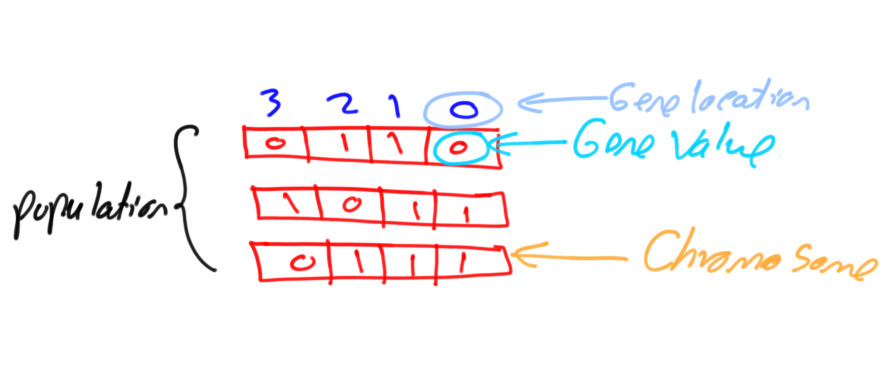
Get started with the genetic algorithm by reading the tutorial titled [**Introduction to Optimization with Genetic Algorithm**](https://www.linkedin.com/pulse/introduction-optimization-genetic-algorithm-ahmed-gad) which is available at these links:
350
+
351
+
Read about building neural networks in Python through the tutorial titled [**Artificial Neural Network Implementation using NumPy and Classification of the Fruits360 Image Dataset**](https://www.linkedin.com/pulse/artificial-neural-network-implementation-using-numpy-fruits360-gad) available at these links:
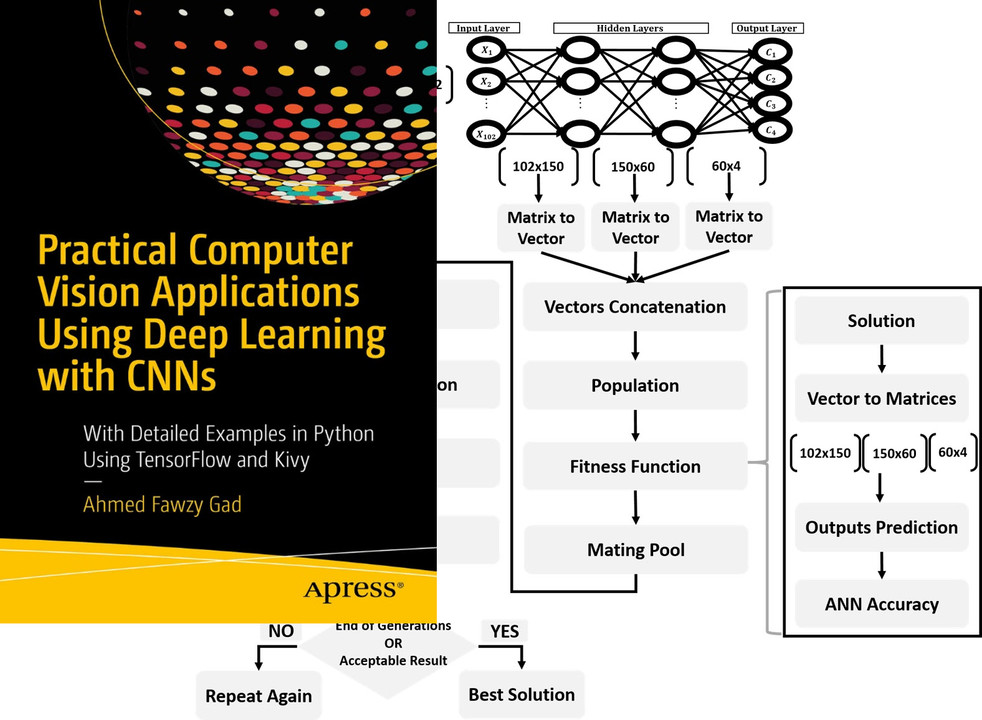
Read about training neural networks using the genetic algorithm through the tutorial titled [**Artificial Neural Networks Optimization using Genetic Algorithm with Python**](https://www.linkedin.com/pulse/artificial-neural-networks-optimization-using-genetic-ahmed-gad) available at these links:
366
+
367
+
You can also check my book cited as [**Ahmed Fawzy Gad 'Practical Computer Vision Applications Using Deep Learning with CNNs'. Dec. 2018, Apress, 978-1-4842-4167-7**](https://www.amazon.com/Practical-Computer-Vision-Applications-Learning/dp/1484241665) which discusses neural networks, convolutional neural networks, deep learning, genetic algorithm, and more.

0 commit comments